2026 Release Notes
May 2026 Update v2.4.2
This update focuses on AI Workflow experience upgrades, enhanced ShortDrama creative capabilities, and Playground usability improvements. We continue to improve workflow efficiency, resource management, and the overall creator experience, making AI content creation more flexible, efficient, and stable.
🖥️ Console / AI Workflow Updates
✨ Platform Experience Improvements
- Added a “Contact Us” button in the header: Users can now quickly report website issues and submit feedback via email for faster communication and support.
- Added account switcher support: Multi-account users can now switch accounts more conveniently without repeatedly logging in and out.
- Added estimated credit cost display: Playground, ShortDrama, and AI Workflow now display estimated credit usage before generation, helping users better understand generation costs.
- Thumbnail preview optimization across the platform: Added thumbnail previews and performance optimizations in many areas of Playground, ShortDrama, and AI Workflow, significantly improving browsing and loading performance.
🎨 Playground
🛠️ Fixes & Experience Optimizations
- Fixed missing conversation context issue in new AI chat sessions: Resolved a problem where newly created AI chat sessions lost conversation context, improving chat continuity and stability.
- Fixed image and video download issues: Resolved bugs that occasionally prevented users from downloading generated images and videos successfully.
🎬 ShortDrama
🚀 Creative Capability Enhancements
- Added custom style support: Creators can now configure personalized styles to better match creative requirements.
- Added new built-in system styles: Introduced around 20 new preset styles to help creators quickly generate content in various themes and visual styles.
- All-in-one reference creation now supports audio/video reference parameters: Reference-based creation capabilities have been expanded to support audio and video references for more consistent and expressive results.
🧠 AI Workflow
🆕 New Features
- Added Recycle Bin to Asset Management: Users can now restore or permanently delete assets more safely and flexibly.
- Added Text-to-Audio node: Supports generating audio directly from text prompts within workflows.
- Added Load Audio node: Supports loading existing audio assets into workflows for editing and composition.
- Added Preview Audio node: Allows real-time audio preview directly inside workflows, improving debugging and creation efficiency.
- Added tab support: Users can now open and switch between multiple workflow tabs more conveniently.
- Added workflow sharing support: Workflows can now be shared directly with others, improving collaboration and content distribution.
- Support dragging assets directly onto the canvas: Assets can now be dragged directly into the workflow canvas and automatically converted into loading nodes.
- Added Ctrl+C / Ctrl+V shortcuts: Node copy and paste shortcuts are now supported, improving workflow editing efficiency.
🎨 Canvas & Interaction Improvements
- Mini-map now supports canvas dragging: Users can drag the workflow viewport directly from the mini-map, making large workflow editing easier.
- Header function buttons now support free dragging: Toolbar buttons in AI Workflow can now be rearranged freely for a more customizable workspace.
- Optimized new workflow navigation behavior: Newly created workflows now automatically open in a new tab for a smoother editing experience.
🐞 Bug Fixes & Stability Improvements
- Fixed workflow list not updating after deletion: Improved workflow data synchronization and list refresh stability.
- Fixed lag when resizing nodes: Improved performance and smoothness when changing node dimensions.
- Fixed Audio / Video assets not displaying in outputs: Resolved issues where generated audio and video assets sometimes failed to appear correctly.
- Fixed textarea drag issues inside nodes: Improved stability and interaction experience when resizing textarea inputs inside workflow nodes.
This update further enhances Modellink’s capabilities in AI workflow creation, multimedia content generation, and overall platform interaction experience. We will continue optimizing creation efficiency, resource collaboration, and intelligent workflow ecosystems to provide creators with a more stable, efficient, and flexible AI creation platform.
May 2026 Update v2.4.1
This update focuses on expanding AI Workflow node capabilities, enhancing the template creation ecosystem, and improving the Playground user experience. We continue to optimize workflow orchestration, resource management, and creator collaboration to make AI creation more flexible, efficient, and stable.
🧠 AI Workflow
🆕 New Node Capabilities
- Added Text Display Node: Supports direct display of generated text results and structured previews, making it easier for creators to inspect content outputs in real time.
- Added Video Preload Node: Supports video resource preloading to reduce waiting time during workflow execution and improve overall smoothness.
- Added Video Save Node: Workflows now support saving generated video results for easier management and future reuse.
- Added Style Node: Enables creators to switch between different styles during the creation process, providing more creative flexibility for image and video generation.
🎨 Node & Canvas Optimizations
- Load Image Node Now Supports Resource Library Selection: Users can now directly select historical images from the AI Resource Library for faster asset reuse.
- Load Image Node UI Improvements: Redesigned the Load Image node interface to better match modern visual aesthetics and improve usability.
- Optimized Initial Canvas Size: Adjusted the default canvas layout and sizing for a more comfortable editing experience upon entering the page.
- Fixed Missing Connection Lines in Load Image Node: Resolved an issue where node connection lines could unexpectedly disappear in certain situations.
- Workflow List Sorting Optimization: Fixed inconsistent ordering issues when sorting workflows by creation time in descending order.
- Loaded Images Automatically Added to AI Resource Library: Images loaded during workflow creation are now automatically synced into the AI Resource Library for easier management and reuse.
- Task Cancellation Reason Support: Users can now view cancellation reasons after workflow tasks are canceled, making troubleshooting and task tracking easier.
🚀 Templates & Creator Ecosystem
- Added Workflow Template Module: Public workflows can now be shared as templates, allowing other creators to reuse and build upon them.
- Templates Support Latest Sorting: Users can browse templates by latest uploads to quickly discover new content and workflows.
- Templates Support Most Popular Sorting: Added popularity-based sorting to help users discover high-quality and trending workflow templates more easily.
🎨 Playground
🛠️ Login & Console Experience Improvements
- Fixed Logout Redirect Issue: Resolved an issue where users remained stuck on the auth page after logging out, improving the authentication flow experience.
- Fixed Default Project Issue Between A/B Accounts: Resolved a bug where switching between different accounts could result in incorrect default project selection.
- Transaction History Now Supports Refresh Queries: Users can now manually refresh transaction history to retrieve the latest records in real time.
- Usage Statistics Now Support Refresh Queries: Added refresh support for usage statistics to ensure more timely and accurate data updates.
This update further strengthens Modellink’s capabilities in AI Workflow node expansion, template-based collaborative creation, and overall platform usability. We will continue improving workflow efficiency, resource collaboration, and creator ecosystem features to deliver a more stable and powerful AI creation experience.
April 2026 Update v2.3.2
This update focuses on AI Workflow experience optimization, Short Drama workflow fixes, and Playground capability improvements. We continue refining node orchestration, canvas interaction, resource management, and content generation processes to enhance overall efficiency and system stability.
🧠 AI Workflow
🚀 Experience & Interaction Improvements
- Fixed canvas disappearing after execution: Resolved an issue where the canvas would disappear after workflow execution, ensuring a stable editing experience.
- Fixed “Save As” button issue: Addressed the problem where the Save As button was not clickable, improving workflow duplication and saving experience.
- Sidebar node preview enhancement: Added tooltip support for long node titles to ensure complete visibility of node information.
- Fixed sidebar width expansion issue: Prevented layout breakage caused by content stretching the sidebar width.
- Task list interaction optimization: Replaced skeleton loading with a loading spinner to reduce perceived lag and improve visual smoothness.
- Improved internationalization support: Enhanced multi-language consistency across parts of the interface.
🧩 Node & Canvas Enhancements
- Node UI redesign: Refactored node styles to better align with visual aesthetics and platform consistency.
- Improved drag interaction: Expanded draggable areas to make node manipulation more intuitive and efficient.
- Added node status field: Enabled admins to configure node availability, allowing quick disabling of unavailable nodes.
- Fixed image load/save/preview issues: Resolved multiple issues related to image handling within workflows for better stability.
🎬 Short Drama
📦 Workflow & Usability Improvements
- Fixed script progression issue: Resolved a bug where users could not proceed without modifying the script content.
- Fixed character image refresh issue: Ensured newly added character images refresh automatically after editing.
- Model selection optimization: Upcoming models are now disabled for selection to prevent invalid usage.
- Video generation model filtering: Disabled models are no longer displayed, reducing confusion and misoperations.
- Fixed “Animate” sync issue: Resolved an issue where
listAnySyncwas not triggered after converting to animation. - Improved rendering state persistence: When refreshing during video generation, the page now correctly retains the "generating" loading state.
🎨 Playground
🛠️ Fixes & Improvements
- Fixed image-to-image reference issue: Resolved a bug where reference images were not applied correctly.
- Fixed backend config save issue: Ensured that updates to capability configurations are properly saved and applied.
This update further improves Modellink’s stability and usability in AI workflow orchestration, short drama creation, and generation capability management. We will continue optimizing efficiency, interaction experience, and feature expansion to deliver a smoother and more powerful creative platform.
April 2026 Update v2.3.1
This update focuses on enhancing the AI Workflow experience and optimizing the short drama creation process. We’ve improved node orchestration, canvas interactions, and resource management to help creators build and manage workflows more efficiently, while also making short drama creation smoother and more intuitive.
🧠 AI Workflow
🚀 Experience Upgrades
- Updated Brand Identity: The AI Workflow module now features the new Modellink logo, creating a more consistent and recognizable visual experience.
- Enhanced Sidebar Navigation: Added quick access to Playground and Short Drama, improving cross-module interaction and workflow efficiency.
- Internationalization Support: The workflow interface now supports multiple languages, making it more accessible to global users.
- Expanded Canvas: A larger canvas provides more space for complex workflow creation, improving overall usability and comfort.
🧩 Node Interaction & Editing Improvements
- Free Node Dragging: Nodes can now be freely moved for more flexible layout design.
- Zoom In/Out Support: Easily navigate large workflows with canvas zooming.
- Keyboard Shortcuts:
Ctrl + S: Save workflow quicklyDelete: Remove selected nodes or elements
- UI & Connection Optimization: Improved node layout and connection rendering for a clearer and more intuitive editing experience.
⚙️ Feature Enhancements
- Image Preview in Load Image Node: Instantly preview images within the node to improve asset validation efficiency.
- Optimized Workflow Data Structure: Different nodes can now use different models, significantly increasing flexibility and extensibility.
- New Text-to-Speech Node: Added support for generating audio from text, enabling more multimedia creation scenarios.
- Resource Display Feature: Generated assets can now be centrally viewed and managed.
- Activity List Performance Improvements: Reduced lag and added detailed error display to help diagnose issues faster.
- Improved Workflow Actions Layout: Optimized the placement of edit, delete, and other actions for better usability.
🎬 Short Drama
📦 Character Library Revamp
- Rebuilt Character Management System: The character library has been fully redesigned, making the character generation process smoother and more efficient, with a significantly improved user experience.
This release further strengthens Modellink’s capabilities in workflow orchestration, resource management, and cross-module collaboration. We will continue to focus on improving efficiency, usability, and extensibility to deliver a more seamless AI creation experience.
April 2026 Update v2.3.0
This update introduces the new AI Workflow platform, enabling creators to flexibly compose different capabilities through a node-based approach to support diverse creative scenarios. It also adds workflow execution control and asset management features, further improving overall productivity and controllability.
🧠 AI Workflow
🚀 New Release
- All-new AI Workflow Platform: Build and orchestrate creative processes through node-based workflows. Flexibly combine multiple AI capabilities to fit various use cases, significantly improving efficiency and scalability.
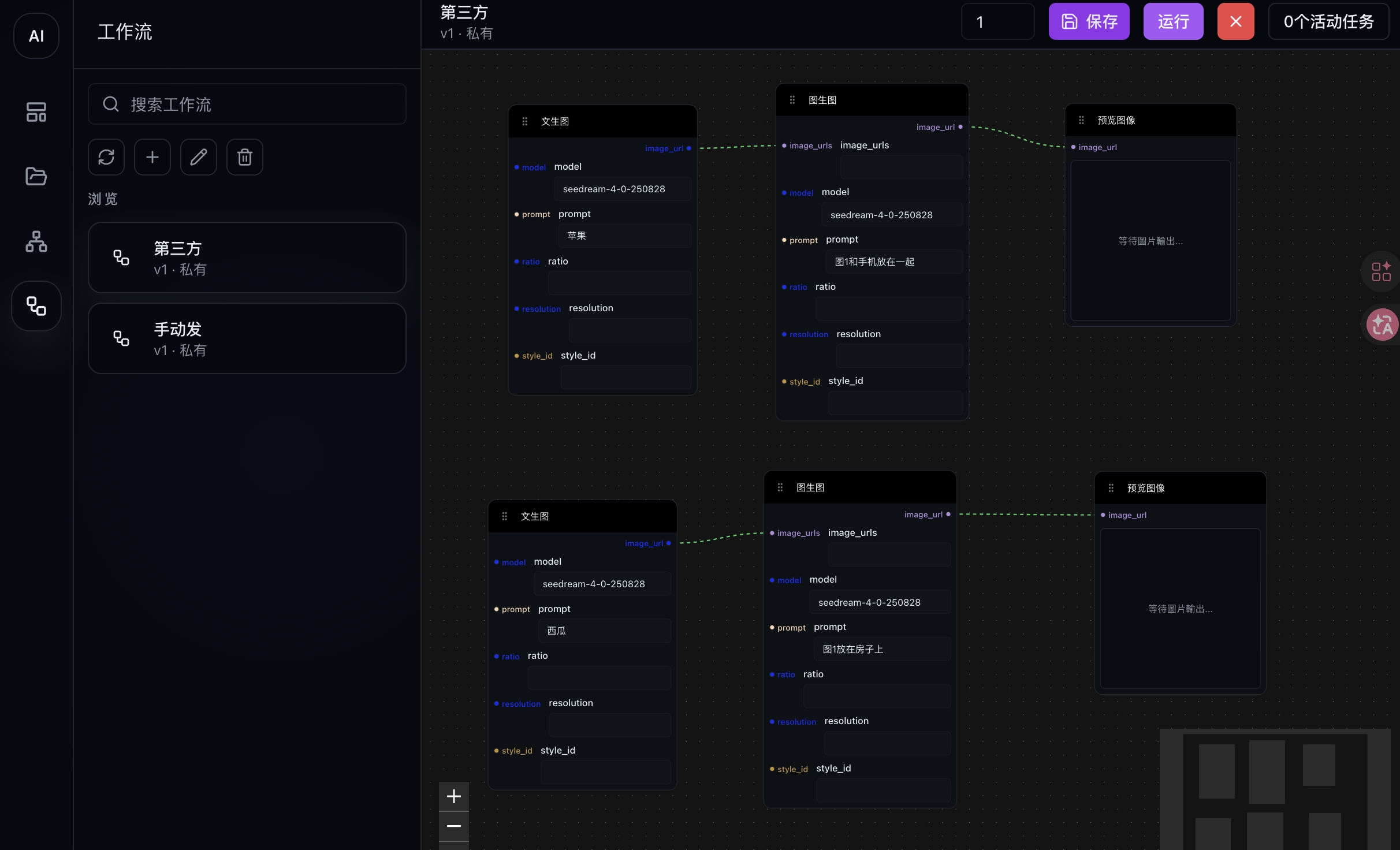
🧩 Node Capabilities
The current version supports the following core node types:
-
Image Nodes
- Text-to-Image
- Image-to-Image
- Load Image
- Preview Image
- Save Image
-
Video Nodes
- Text-to-Video
- First & Last Frame to Video
- Reference Image to Video
-
LLM Nodes
- Responses (text generation and conversational capabilities)
⚙️ Features
-
Workflow Execution Control
- Manually cancel running workflow tasks for better control
- View workflow execution status to track progress
-
Asset Management
- Centralized management of generated images and videos
- Improved content organization and reusability
April 2026 Update v2.2.10
This update focuses on AI chat interaction improvements, the launch of AI Workflow capabilities, and stability upgrades across the Short Drama creation flow, bringing a smoother experience for generation control, node-based creation, and character/storyboard workflows.
🤖 Playground (AI Chat)
🚀 Improvements
- Better generation control: While AI chat is generating a response, sending new messages is temporarily disabled and a pause button is provided, making the interaction clearer and closer to leading chat products.
🎬 Short Drama
🚀 Enhancements
- Improved character generation and binding: Optimized the character generation page experience and enhanced one-click character binding, making character matching and asset management more efficient and natural.
- Smoother image and animation refresh flow: When entering the image generation page for the first time or using one-click animation, completed content now refreshes more reliably and appears more promptly.
⚡️ Experience Optimization
- Friendlier storyboard error prompts: When storyboard decomposition encounters busy states or unexpected issues, the system now provides clearer guidance to reduce interruption during creation.
🐞 Bug Fixes
- Fixed an issue where updates made in the video character component were not reflected in time.
- Fixed an issue where occasional storyboard decomposition errors caused abnormal frontend displays.
- Fixed broken image placeholders when start or end frames were missing in video redraw, and now correctly guides users to upload missing assets.
April 2026 Update v2.2.9
This update focuses on improving Short Drama stability and enhancing AI chat experience, while also expanding image generation capabilities and fixing several key issues to ensure smoother and more consistent creation workflows.
🤖 Playground (AI Chat)
🐞 Bug Fixes
- Fixed an issue where messages sent in chat A appeared in chat B.
- Fixed context memory issues in AI chat.
🚀 Improvements
- Model Usage Optimization: The current chat now strictly uses the selected model, preventing errors caused by context inconsistencies.
🔌 API
⚙️ createResponses API Parameters
- max_output_tokens
- thinking
- reasoning
- temperature
- top_p
- text
- tools
- tool_choice
- max_tool_calls
- context_management
🎬 Short Drama
🚀 Enhancements
- Reference-to-Video Upgrade: Introduced character components when generating videos from reference images in scripts, improving character consistency.
- Video Generation Expansion: Added support for narration and character voice generation fields.
- Storyboard Stability Improvement: When data anomalies occur during storyboard decomposition, an automatic recovery mechanism is triggered to prevent reprocessing.
⚡️ UI / UX Improvements
- Short Drama Gallery UI Optimization: Improved alignment of filter components for a cleaner interface.
🐞 Bug Fixes
- Fixed issues in script editing, including copy, delete character, and submission bugs.
- Fixed an issue where four-view generation results were not displayed.
- Fixed an issue where selected models for image/video redraw were not persisted after page refresh.
🖼️ Image Generation
🚀 Enhancements
- Extended Parameters: Added support for resolution and aspect ratio in text-to-image and image-to-image APIs, enabling more flexible image creation.
March 2026 Update v2.2.8
This update focuses on AI chat experience improvements and short drama creation enhancements, along with several new features and important bug fixes to deliver a smoother and more efficient creative workflow.
🤖 Playground (AI Chat)
🚀 Improvements
- Auto-generated titles: New chats are automatically assigned a title, no manual naming required.
- Auto-scroll to latest message: Automatically scrolls to the current position after sending a message.
- Quick scroll button: Added a “↓” button to instantly jump to the latest message.
🎬 Short Drama
🚀 Enhancements
- Start & End frame preview support: The image generation preview panel now supports displaying both start and end frames for better visualization.
- One-click character binding optimization: Intelligently matches and binds the most suitable character image based on multiple dimensions such as gender, age, style, and tags.
- Script breakdown visualization: Added a visible thinking process during script decomposition, reducing idle waiting and improving clarity.
⚡️ Experience Optimization
- Script editor redesign:
- Supports storyboard sorting
- Richer content display (start frame / end frame / video / description / subtitle settings)
- Supports displaying characters appearing in start/end frames
- Added start-end frame linkage toggle
🚀 New Features
- Assist image support for image-to-video (Playground): Improves controllability and diversity of generated results.
- Reference image mode for storyboard video generation: Enables video generation based on reference images.
- Enhanced character tools in image redraw: Added convenient operations for quickly adjusting and replacing on-screen characters.
- Gallery filtering: Image gallery now supports filtering by type (All / Current storyboard) for easier navigation.
🐞 Bug Fixes
- Fixed an issue where storyboard video generation remained in a loading state after completion.
- Fixed an issue where system prompts did not reappear after clicking the optimize button in image generation / video conversion.
March 2026 Update v2.2.7
This update focuses on optimizing the short drama creation workflow and enhancing AI capabilities, delivering a smoother and more intelligent creative experience.
🎬 Short Drama
🚀 Features & Enhancements
- Auto-save for Subtitle Editing: Subtitles are now automatically saved while editing, eliminating the need for manual saves.
- Model Selection Memory: Image and video generation models remember your previous selections for faster reuse.
- Media Library Selection: You can now select existing assets from the library when generating images and videos.
- Video Generation Parameters: Customize video duration, resolution, and more.
- Reference Image Selection: Choose reference images from the library when generating first and last frames for better control.
- Voiceover Option: Option to enable or disable voiceover during video generation.
- Character Generation Enhancement: Supports style ID retention and four-view character generation.
⚡️ Experience Improvements
- Improved the voice preview component for a more intuitive and visually appealing experience.
- Enhanced the image generation page to better support consistency between images and videos, enabling more advanced creative workflows.
🐞 Bug Fixes
- Fixed an issue where unpublished videos appeared in the "Explore" page.
- Resolved lock contention errors during secondary video generation in the editor.
- Fixed an issue where end-frame prompts were incorrectly saved as start-frame prompts.
- Fixed an issue where historical images appeared blank after character generation failures.
- Fixed the "Go Back" button not responding in the editor.
🤖 Playground (AI Chat)
🚀 Features & Enhancements
- AI Chat Upgrade: Improved interaction experience aligned with mainstream chat interfaces, providing more natural and fluid responses.
🔌 API
🚀 Features & Enhancements
- Stream Parameter Support
responsesAPI now supportsstreamchatAPI now supportsstream
👉 Enables streaming responses for real-time output scenarios
🧠 Summary
This release focuses on three main areas:
- Comprehensive upgrades to the short drama creation experience (core)
- Enhanced AI interaction capabilities (Playground)
- Improved API capabilities with streaming support
March 2026 Update v2.2.6
This release focuses on Playground enhancements, improvements to the short-drama creation workflow, and upgraded billing statistics, bringing better stability and a more efficient creative experience.
🚀 New Features
🎬 Playground & Creation Enhancements
- Image-to-Video now supports start and end frames, improving generation control and visual continuity.
- Script expansion now supports custom prompts, allowing creators to control style and output more precisely.
- Text-to-Audio in Playground now supports language selection, enabling more multilingual voice generation scenarios.
🧑🎨 Character & Asset Management
- New "My Character Library" for saving and reusing generated character assets.
- AI character generation now supports custom prompts and model selection, giving creators greater flexibility.
🖼️ Image Generation Page Redesign
The image generation workflow has been fully upgraded:
- Support for start frame and end frame control
- Voice preview and subtitle preview for characters
- Storyboard character binding upgrade: supports both character voiceover and narration
- Select assets directly from previously generated images/videos without losing historical data
💳 Billing Statistics Upgrade
- Billing metrics updated: request counts are now replaced with Credit consumption statistics for clearer cost tracking.
- Billing page now supports aggregated consumption statistics for short drama projects.
⚡ Improvements
- Script page style selection now supports scrolling
- Console now displays model pricing
- 9:16 image display optimized on the image editing page
- Character generation improved: pure white background + full-body character images
- Editing page now supports returning to the previous image generation page
🛠️ Bug Fixes
- Fixed missing sound effects during video composition
- Fixed “no video” display issue on the detail page
- Fixed incomplete character profile generation
- Fixed duplicate characters when using one-click character selection
- Fixed several other known issues to improve overall stability and performance
March 2026 Update v2.2.5
This update introduces new playground capabilities, expands model coverage, and enhances image-to-video and short drama workflows.
✨ New Features
- Added AI Chat to the playground
- Added Text-to-Speech in the playground
🧪 Models Added
- seedream 5.0 lite
- seedance 1.5 pro
- GLM 4.7
🖼️➡️🎥 Image-to-Video API
- Supports either reference images or first/last frame content (choose one)
🎭 Short Drama
- Intelligent expansion and storyboard breakdown support manual language model selection
- First-frame image & video generation support manual model selection
- In the image generation page, the current segment supports adding/removing roles
- System scripts upgraded for better content quality
March 2026 Update v2.2.4
This update focuses on urgent fixes and experience improvements across AV synthesis, navigation display, and the short drama creation workflow.
🛠️ Emergency Fixes
- Urgently fixed audio-video synthesis issues to ensure stable generation and final output quality
🧮 Precision & Display
- Fixed wallet balance precision in the navbar and unified numeric display rules
- Increased navbar project display count cap to 99 to better support heavy usage scenarios
✍️ Creation Experience
- Persisted style, model, and video ratio selections on the script creation page for smoother consecutive creation
- Improved generate button debounce on the edit page to reduce accidental duplicate submissions
🎬 Video Synthesis
- Improved subtitle rendering for better readability and visual consistency
March 2026 Update v2.2.3
This release cycle (Feb 13 – Mar 03) focuses on short drama publishing, model updates, documentation and policy improvements, and overall system consistency optimization.
🚀 New Features
- Short Drama Publishing: Support one-click publishing for completed short dramas, including publishing settings and visibility controls.
- Character Reuse: Support one-click binding of previously created character profiles to new scripts within a project, enabling unified character management.
- Wallet Balance: Support displaying wallet balance on the navigation bar, with the ability to open a top-up dialog for users to easily top up their accounts.
- Short Drama Entries: Add multiple entry points (navigation bar, sidebar, profile) for quick access to short drama-related features.
📚 Documentation & Policies
- Updated the list of available models and usage guidelines.
- Updated API documentation with additional examples and error codes.
- Introduced Refund Policy and Privacy Policy, with in-product access links.
✨ Experience & Consistency Improvements
- Unified overall system styling with the Short Drama module (buttons, color palette, and typography).
- Improved audio-video synchronization in generated short drama videos.
- Optimized production workflow details, with clearer progress tracking and status feedback.
🛠️ Bug Fixes
- Fixed script editing content update issue.
- Fixed DeepSeek billing display issue.
- Fixed short drama image generation creation issue.
- Resolved multiple known issues to improve stability and performance.
February 2026 Update v2.2.2
This February update brings a brand new short drama creation feature. From script writing to final video assembly, you can complete the entire creative workflow in one place. You can now easily create your own short drama content without professional skills.
🚀 New Features
- Short drama creation: Full short drama production flow—script editing, character setup, image and video generation, and final assembly
- Script editor: Intuitive script authoring with plain text and JSON editing
- Character management: Create and manage short drama characters with smart persona matching
- Image generation: Auto-generate scene images from your script
- Video generation: Turn scene images into animated video clips
- Video assembly: Combine all clips into a complete short drama video
✨ Improvements & Optimizations
- Smoother state flow on the short drama production page
- Clearer progress display throughout the creation process
- Chinese and English interface switching
February 2026 Update v2.2.1
This February update brings an exciting new feature—image-to-video generation. You can now directly generate video content from images, expanding the application scenarios for images. Additionally, we've optimized the multilingual display issues on the billing page and fixed multiple detail issues, further improving the platform's stability and user experience.
🚀 New Features
- Added image-to-video generation, you can now use images to generate videos
✨ Improvements & Optimizations
- Optimized multilingual display issues on the billing page
- Fixed multiple known issues to improve stability and performance
January 2026 Update v2.1.4
This update introduces a points task system. You can earn daily point rewards by sharing on social media.
🚀 New Features
Points Tasks
- USD Upgraded to Points: We have now upgraded USD balances in accounts to points, providing a more flexible way to use points
- Share Reward Tasks: New share point tasks allow you to earn daily point rewards by sharing on social media, helping more people learn about our platform
✨ Improvements & Optimizations
- Fixed multiple known issues, improving stability and performance
January 2026 Update v2.1.3
This update introduces an invitation system, allowing you to earn credit rewards by inviting others to register
🚀 New Features
Invitation System
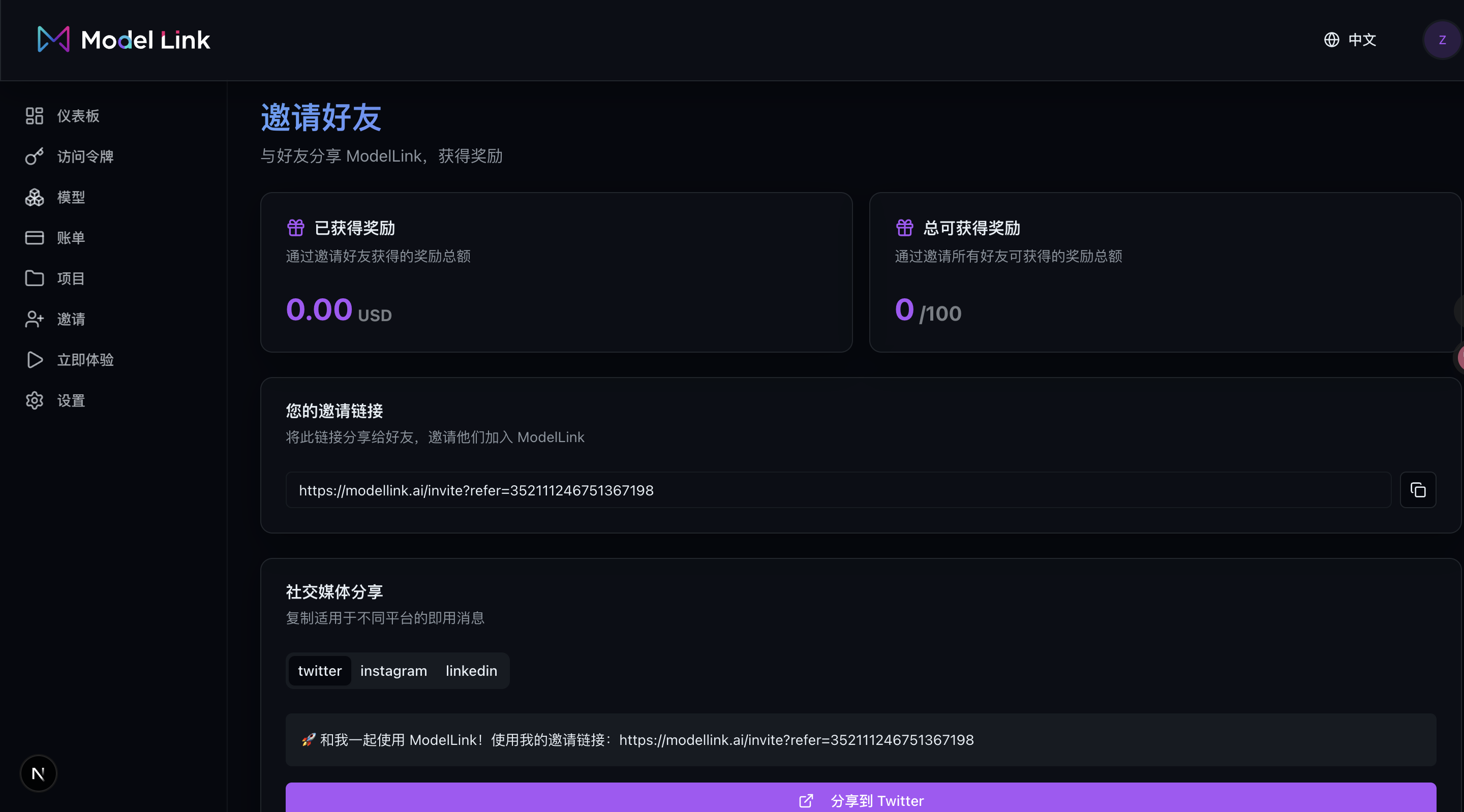
- New invitation system: users can generate exclusive invitation links, and both parties will receive credit rewards after inviting others to register
- Users can view the list of invited users, total available invitation rewards, and invitation links in the console
✨ Improvements & Optimizations
- Fixed multiple known issues, improving stability and performance
January 2026 Update v2.1.2
This update mainly introduces enhancements to the Browse Mode, improved handling of expired historical resources, and better visibility management for user resources.
🚀 New Features
Multi-View Mode
Browse Mode
- Added support for deleting a single image
✨ Improvements & Optimizations
- Support setting the default value for whether an image appears on the Explore page. New images will automatically apply this setting.
- The password change page now allows users to preview their new password as plain text.
- Fixed multiple known issues to improve stability and performance
January 2026 Update v2.1.1
This update mainly introduces date and type filters in Browse Mode, supports batch download and deletion of images, and optimizes the overall UI layout.
🚀 New Features
Multi-View Mode
Browse Mode
- Added date and type filters
- Supports batch download and deletion
- Optimized overall UI layout
✨ Improvements & Enhancements
- Improved overall UI and interaction experience, with smoother transitions
- Fixed several known issues, enhancing stability and performance